macOS · menu bar · nothing leaves your Mac

Know what happened in the room while you were out.

Owl Cam turns a Mac and any webcam or iPhone into a camera that records only when something happens — and keeps recording as long as someone is in the room. The video stays on the Mac.

✓ Notarized by Apple ✓ No account, no cloud ✓ Free for one camera macOS 14+ · Apple Silicon & Intel
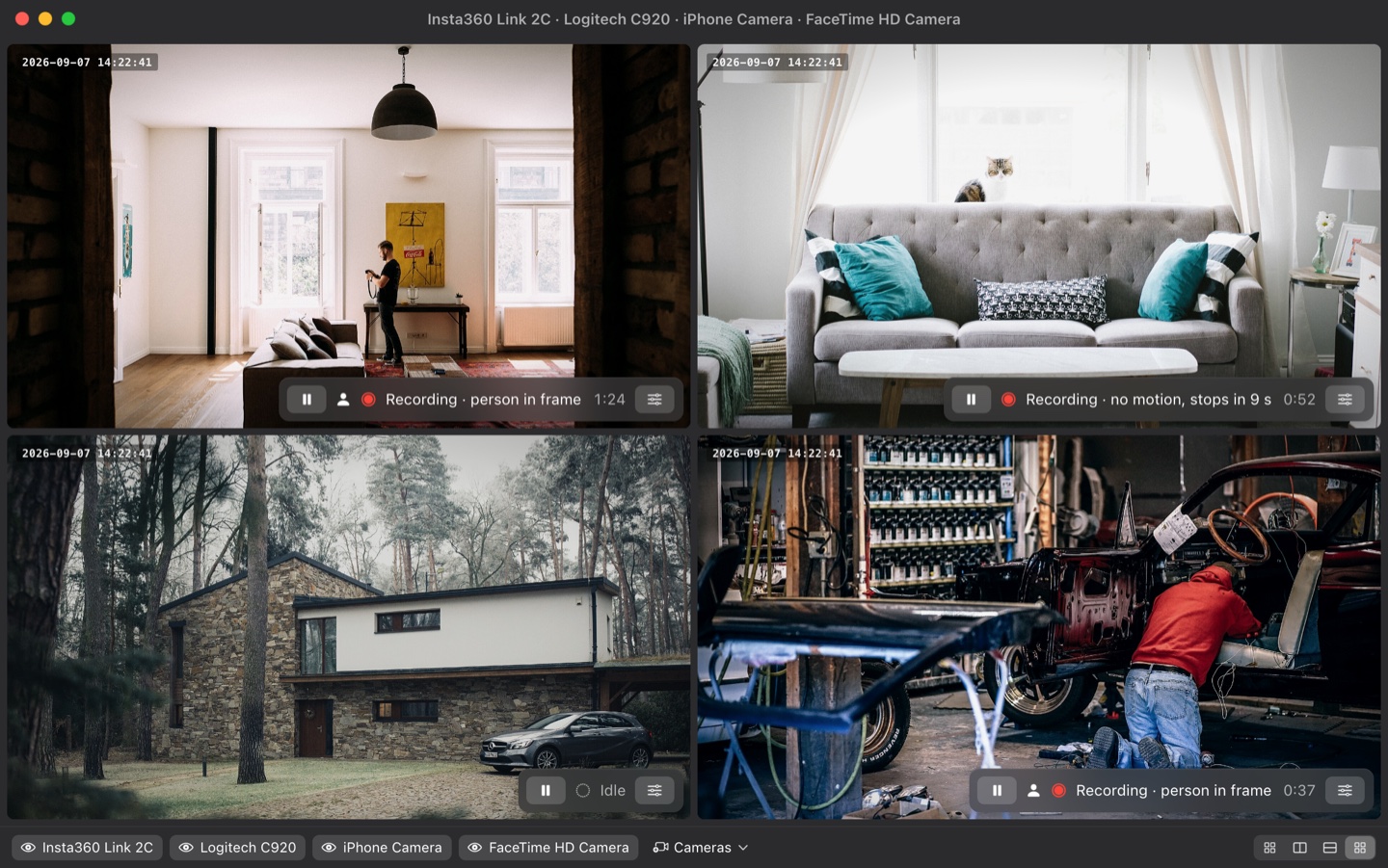
Owl Cam live view with four cameras: two recording with a person in frame, one finishing a clip, one idle
Who it's for

You already own the camera. It's the Mac you're not using.

The desk you leave behind

Out for the afternoon

You want to know whether anyone came near your desk while you were gone — and see it, rather than wonder.

The Mac on the shelf

An old MacBook, still working

Point it at the front door, the cot, the workshop. It costs nothing to try and it was going to sit in a drawer anyway.

The counter

A shop, studio or clinic

An iMac already faces the room. An iPhone on a stand adds the second angle, without a subscription or a new box on the wall.

Not you? If you want to open an app at the office and watch a live feed, or get a push the second someone walks in, Owl Cam is the wrong tool. It records for you to review later — it does not stream and does not notify.
The problem

Motion recorders cut you off.

Sit still for ten seconds and the clip ends. Move again and a new one starts. An evening at the desk becomes forty fragments, and the moment you actually want is split across two of them.

Typical motion recording
14 clips

One person, one hour at a desk. Three of the clips are under five seconds. Finding the moment means opening all of them.

Owl Cam
1 clip

The same hour, one file, starting three seconds before the first movement and ending when the room is genuinely empty again.

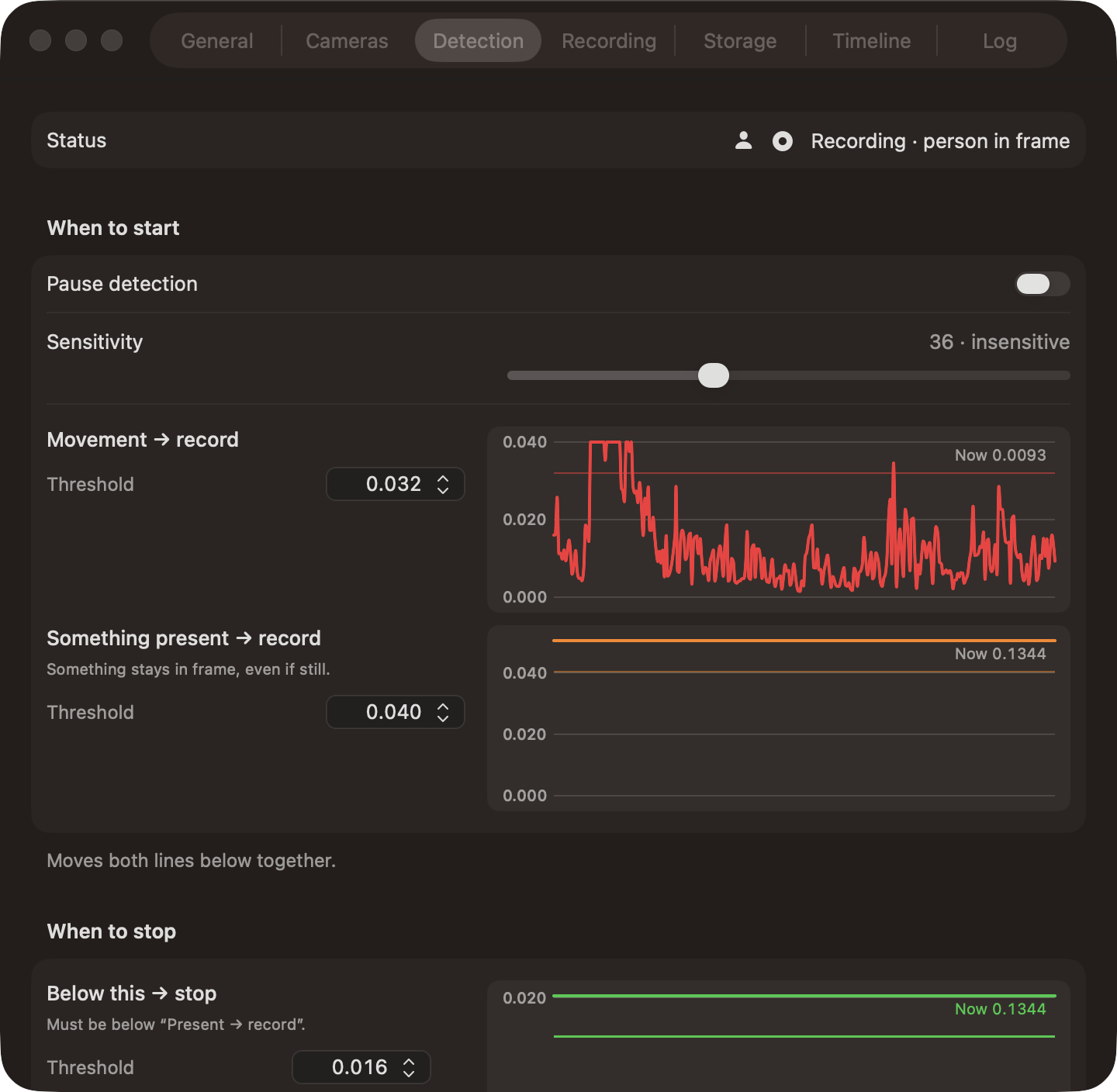
Three readings, three lines.

Owl Cam keeps a frozen picture of the empty room and compares every frame against it — so a person who stops moving is still obviously there.

Movement → record. Frame-to-frame change. Fast, immune to a light being switched on. It can only start a clip, never end one.

Something present → record. Difference from the empty scene. Stays high while anything new is in the room — a person, an animal, a parcel — even if it holds still.

Below this → stop. The clip ends only after the reading falls under the line and stays there. And never while Apple's on-device Vision still recognises a person.

Detection settings with live charts for the three thresholds

Every number above is yours to move, and the charts update as you drag. There is nothing hidden behind an "AI sensitivity" slider.

Privacy

The video never leaves your Mac.

This is the whole reason the app exists on your machine instead of in someone's cloud. It is also the one claim you should not take on faith — so here is how to check it yourself.

Storage

Files, in a folder you chose

Plain .mp4 files you can open in QuickTime, move, or delete. No database, no proprietary container, no vendor lock-in.

Detection

On this Mac's chip

Motion analysis and Apple's Vision person detection run locally, on frames that are never written anywhere but your recordings.

Network

One request, only if you buy

The single outbound call is validating a Pro licence key. No account, no sign-up, no analytics, no crash reporting. The free version never calls out at all.

# Confirm the app is signed and notarized by Apple
codesign -dvv /Applications/Owl\ Cam.app
spctl -a -vv -t install /Applications/Owl\ Cam.app

# Then watch it: with a network monitor such as LuLu or Little Snitch,
# the free version makes no outbound connection at all.
What's in the box

Small app. Every piece earns its place.

Pre-roll

Starts before it started

A rolling buffer puts the first seconds of every event into the file, instead of losing them while the detector made up its mind.

Review

Calendar → timeline → frames

Days with people in them are marked. Drag a span on the timeline to get thumbnails; click one to play from that second.

Cameras

USB, built-in, iPhone

Any camera macOS can see, Continuity Camera included. Each one detects and records independently, into its own folder.

Timestamp

Burned in, exact

Each frame carries the moment it was actually captured — pre-roll included — in the position, size and format you choose.

Storage

A budget, with protection rules

Cap by size or by free space. Delete oldest, smallest, or clips without people first — and keep anything recent, large or marked.

Backup

NAS, with a USB fallback

Copies finished clips off the Mac and verifies them byte for byte. If the NAS is asleep, the USB drive takes over and the NAS catches up later.

Backup rules

Only what's worth keeping

Copy a clip only if it matches: two people at once, longer than five minutes, over 60 MB, at night, from that one camera.

Updates

Told, then one click

The app checks once a day and offers the new version in place. Each update is notarized by Apple and signed with Owl Cam's own key — it installs only if both check out.

Schedule

Quiet hours

Pause by weekday and time window. A recording in progress is never cut short; it simply won't start a new one.
Honest limits

What it doesn't do.

Better to read this now than to find out after paying.

No alerts There is no phone notification when someone walks in. You review afterwards.
No streaming You watch the live picture and the recordings on that Mac. There is no remote viewing app.
No IP cameras RTSP and ONVIF are not supported — only cameras macOS itself can see.
iPhone has strings Continuity Camera needs the iPhone locked, charging and near the Mac. A MacBook's built-in camera stops when you close the lid.
Cards only Payment is by Visa or Mastercard through Polar. Alipay and WeChat Pay are not available yet.
Pricing

Free for one camera. $29 once for the rest.

A local app has no servers to pay for every month, so it doesn't ask you to. Buy it once, keep it.

Free

$0 forever
  • One camera
  • Movement + presence detection, pre-roll
  • On-device person detection
  • Calendar & timeline review
  • Built-in detection presets
  • Multiple cameras
  • Timestamp, backup, storage budget
  • Scheduled pauses, custom presets
Download

Pro

$29 one-time · 2 Macs
  • Everything in Free
  • Unlimited cameras
  • Burned-in timestamp
  • Auto backup to NAS / USB, with rules
  • Storage budget with protection rules
  • Per-camera settings
  • Scheduled pauses (quiet hours)
  • Save your own detection presets
  • Email support
Buy Pro

14-day full trial on first launch, no account. 14-day refund, no questions. VAT handled by Polar.

FAQ

Fair questions

Does any video leave my Mac?

No. Detection, recording and review are local, and recordings are plain files in a folder you picked. The only outbound request in the whole app is validating a Pro key — the free version makes none. Backups go wherever you point them, including a drive with no internet at all.

Will it stop recording while I'm sitting still?

That is the one thing it is built not to do. The scene reading stays high while you are in the room, and Vision vetoes every stop while it recognises a person. The only exit is a hard cap you set yourself: fully still for N seconds with nobody recognised.

Is it signed by Apple?

Yes. Every build is signed with a Developer ID and notarized by Apple, so macOS opens it normally — no right-click workaround, and no repeated camera-permission prompts after an update.

How do updates work?

Owl Cam checks for a new version once a day and tells you inside the app; one click downloads and installs it, and the app comes back running. Nothing is sent with the check. You can turn the automatic check off in Settings → General and update whenever you like instead.

Which cameras work?

Anything macOS exposes as a camera: USB webcams (developed against the Insta360 Link 2C), the built-in camera, and an iPhone over Continuity Camera. Each camera runs its own detection and writes to its own folder.

How much disk does it use?

You choose the quality; the settings show the resulting bitrate and an estimate per hour. Then set a storage budget and Owl Cam holds itself to it, deleting by rules you pick rather than filling the disk.

What if I don't like it?

The 14-day trial is the whole app, no account and no card. If you buy and it's not right, email within 14 days and Polar refunds it.

More questions →

Point a Mac at the room and find out.

One camera is free for as long as you want it. Nothing to sign up for.

Notarized by Apple · macOS 14 or later · Universal (Apple Silicon & Intel) · release notes